What Should I Do If the Salon Service Does Not Match My Booking?
Before a salon or beauty service begins, it is important to confirm that the professional is providing the same service you booked through Doorstep Hub.
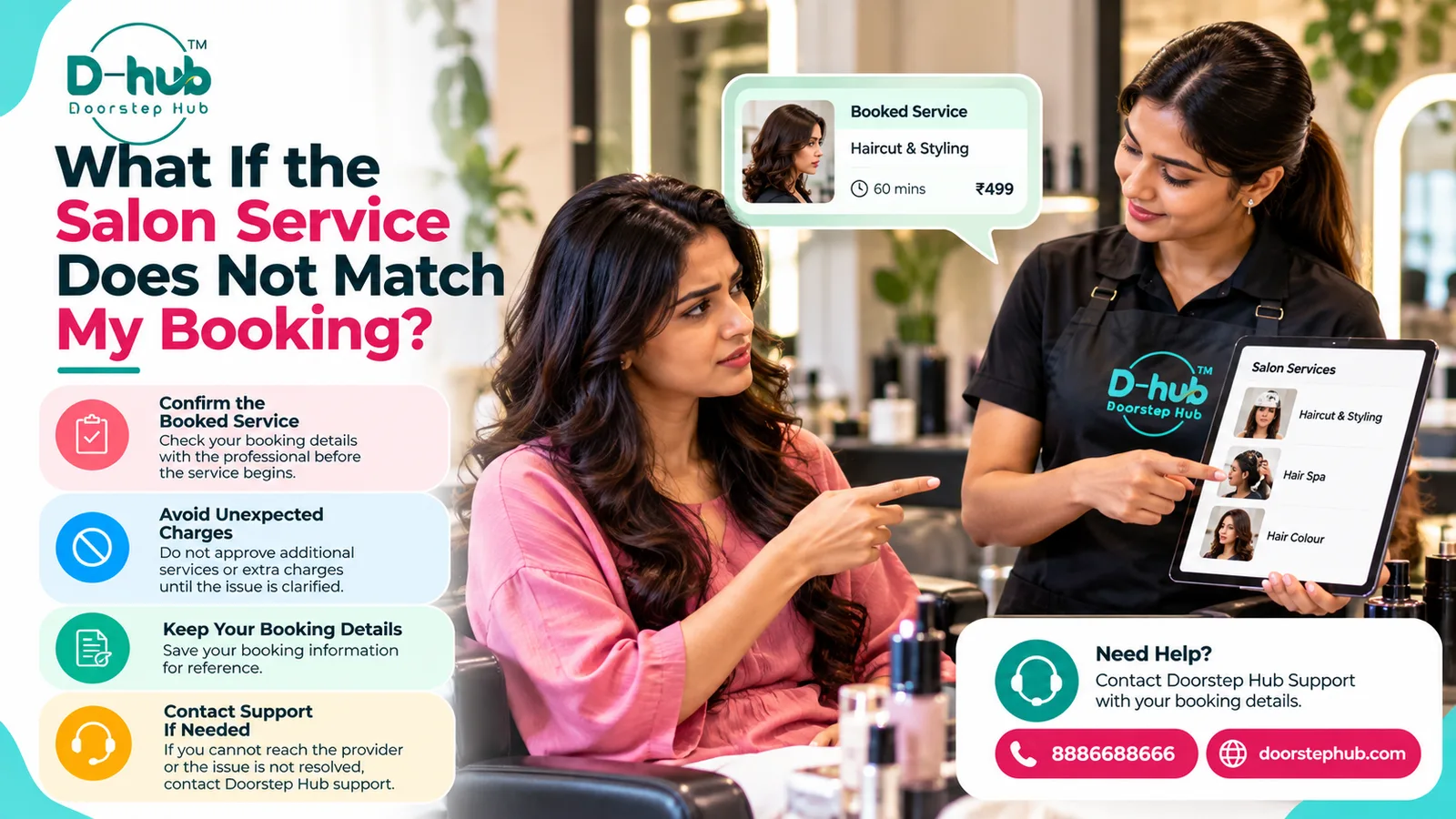
If the service, package, price, provider, or included treatment appears different from your booking, clarify the issue before allowing the service to begin or approving any additional charges.
1. Review Your Booking Before the Service Starts
Open your Doorstep Hub booking and check the important details before the appointment begins.
Review:
- Service name
- Selected package
- Provider
- Location
- Appointment date
- Appointment time
- Service description
- Included treatments
- Displayed price
- Selected add-ons where applicable
Keeping this information available can make it easier to compare the booking with what is being offered.
2. Confirm the Service With the Professional
Before the professional starts, confirm the exact service you booked.
You may verify:
- Service type
- Treatment or package
- Included steps
- Selected options
- Expected duration where shown
- Price displayed in your booking
A simple confirmation before the service begins can help prevent misunderstandings later.
3. Check Whether the Service Matches Your Booking
Make sure the professional is preparing to provide the same service shown in your booking.
For example, confirm that:
- The correct haircut or grooming service is selected
- The correct facial or beauty treatment is being provided
- The booked package matches
- The selected add-ons are correct
- The provider understands your requirement
If anything appears different, ask for clarification before proceeding.
4. Review What Is Included
Two services may have similar names but different inclusions.
Check whether your booking includes specific items such as:
- Hair wash
- Haircut
- Styling
- Blow-dry
- Facial treatment steps
- Manicure or pedicure services
- Grooming treatments
- Product application
Use the service description shown in your booking as your reference.
5. Ask About Any Difference Immediately
If the professional describes a service that does not match your booking, raise the issue before the work begins.
Clearly explain what your booking shows and ask why the offered service is different.
Possible differences may involve:
- Different service
- Different package
- Missing treatment steps
- Different provider
- Unexpected product upgrade
- Additional service
- Different price
Clarifying the issue early can help avoid confusion later.
6. Do Not Approve Unexpected Additional Services
If the professional recommends or offers another service that was not part of your booking, you are not required to accept it.
Before agreeing, ask:
- What is the additional service?
- Why is it being recommended?
- Is it necessary?
- How much will it cost?
- How much additional time will it require?
Only proceed if you understand and agree to the change.
7. Confirm Additional Charges Before Proceeding
Do not assume an additional treatment or upgrade is included in your original price.
If an extra service involves another charge, confirm the amount before the work begins.
This may apply to:
- Additional styling
- Product upgrades
- Extra grooming
- Additional treatments
- Service extensions
- Package changes
Clear price confirmation can help prevent disputes at the end of the appointment.
8. Do Not Feel Pressured to Accept Changes
If the offered service does not match what you booked, take time to clarify the situation.
Do not feel pressured to immediately approve:
- Another package
- More expensive products
- Additional treatments
- Higher charges
- A different service
Your booking details should be reviewed first.
9. Keep Your Booking Information Available
Keep the relevant Doorstep Hub booking details open or easily accessible during the appointment.
Useful information may include:
- Booking reference
- Service name
- Package
- Provider
- Appointment details
- Service description
- Displayed price
This information can help you explain any mismatch clearly.
10. Keep Relevant Communication
If you discussed the issue with the provider or professional, keep any relevant platform communication until the matter is resolved.
This may include:
- Booking information
- Messages
- Service details
- Pricing information
- Support communication
Do not share passwords, OTPs, PINs, or other sensitive authentication information.
11. Contact Doorstep Hub Support When Necessary
If the mismatch cannot be clarified with the professional, contact Doorstep Hub Support.
Keep useful details ready, such as:
- Booking reference
- Booked service
- Provider
- Appointment date and time
- Displayed price
- Description of the service being offered
- Description of the mismatch
Clear information can help support understand the situation.
12. Avoid Starting the Service Until the Issue Is Clear
If there is a significant difference between your booking and what is being offered, consider waiting until the issue has been clarified.
Once an additional treatment or service has already been completed, resolving a disagreement may become more complicated.
Confirm the service first whenever practical.
13. Check the Final Service Before Approving Changes
If the issue is resolved and you agree to a different service or package, confirm the updated details before proceeding.
Check:
- New service
- Included treatments
- Updated price
- Additional time
- Any new conditions
Make sure you understand the revised arrangement.
14. Review Your Booking After the Appointment
After the service is completed, review your Doorstep Hub booking where supported.
Check whether the booking information and status appear correct.
If you notice an unresolved issue involving the service or charges, keep the relevant information and contact support where necessary.
Why Confirming Your Service Matters
Confirming the service before it begins can help both you and the professional understand exactly what has been booked.
It can help:
- Prevent service misunderstandings
- Confirm the correct treatment
- Identify unexpected changes
- Avoid unapproved additional services
- Clarify additional costs
- Keep the appointment aligned with your booking
A short confirmation before starting can prevent larger problems later.
Confirm Your Salon Booking with Doorstep Hub
Before your salon or beauty service begins, confirm the booked service, package, and relevant details with the professional.
If there is a mismatch between your Doorstep Hub booking and what is being offered, clarify it before approving additional services, upgrades, or unexpected charges.
Keep your booking details available and contact Doorstep Hub Support if the issue cannot be resolved.
Need Help with Your Doorstep Hub Booking?
📞 Helpline: 8886688666
🌐 Website: doorstephub.com
📲 Download the Doorstep Hub App
Confirming the service and price before the appointment begins can help create a clearer and smoother salon experience.
Frequently Asked Questions
Common troubleshooting questions answered by our specialists
Was this article helpful?
Your feedback helps us improve our repair guides and service tips.