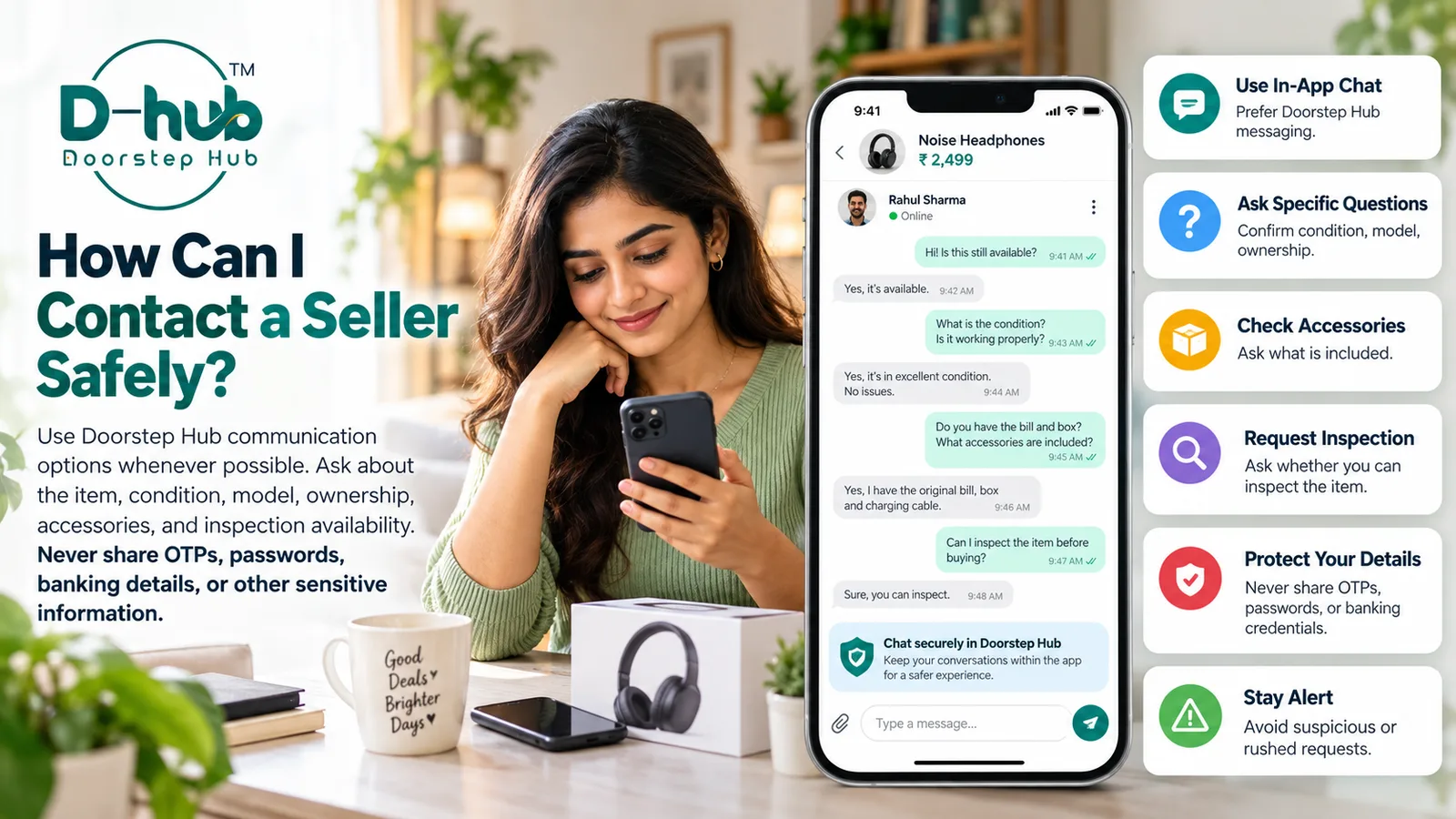
Communicating safely with a seller is an important part of buying a used item online. Before making any decision, take time to ask clear questions, understand the product condition, and avoid sharing sensitive personal or financial information.
When using Doorstep Hub Buy & Sell, use the communication options provided by the platform whenever possible and keep your conversation focused on the item you are interested in.
1. Use Doorstep Hub Communication Options
Whenever available, communicate with the seller through the messaging or contact options provided by Doorstep Hub Buy & Sell.
Using the platform's available communication features can help keep your conversation focused on the listing and make it easier to refer back to product details.
Avoid moving the conversation to unknown or suspicious communication channels without a clear reason.
2. Ask About the Exact Item
Before proceeding, confirm that the seller is discussing the same item shown in the listing.
Ask specific questions such as:
- Is this the exact item shown in the photos?
- Is the item still available?
- What is the brand and model?
- How old is the item?
- How long has it been used?
- What is its current condition?
Specific questions can help you understand whether the listing information matches the seller's description.
3. Confirm the Item Condition
Do not rely only on general descriptions such as “good condition” or “excellent condition.”
Ask the seller about the actual condition of the item.
You may ask about:
- Scratches
- Dents
- Cracks
- Repairs
- Battery condition
- Display condition
- Missing parts
- Mechanical issues
- Functional problems
- Other signs of wear
If necessary, ask for additional recent photographs showing the areas you want to inspect.
4. Verify the Brand and Model
Confirm the exact brand, model, and important specifications before making a purchase decision.
Depending on the product, ask for details such as:
- Model number
- Variant
- Storage capacity
- Size
- Colour
- Manufacturing year
- Technical specifications
This can help prevent confusion between similar-looking products or different model variants.
5. Ask About Ownership and Purchase Details
Where relevant, ask the seller about the item's ownership history.
You may ask:
- Are you the current owner?
- When was the item purchased?
- Is the original purchase invoice available?
- Has the product changed owners before?
- Is any warranty still available?
For certain products, proof of purchase or ownership information may help you better understand the item's history.
Do not rely on documents alone without checking whether the details reasonably match the item.
6. Confirm What Accessories Are Included
Before agreeing on a price, ask exactly what is included with the item.
Depending on the product, this could include:
- Charger
- Remote control
- Original box
- Cables
- Adapter
- Stand
- Carrying case
- Manuals
- Spare parts
- Other accessories
If an accessory shown in the photos is not included in the sale, clarify this before proceeding.
7. Ask About Known Problems or Repairs
Ask whether the item has any known issues or previous repair history.
Questions may include:
- Has the item ever been repaired?
- Are all features working properly?
- Has any major part been replaced?
- Is there any problem not mentioned in the listing?
- Does the item require any immediate repair?
Clear answers can help you understand the item's actual condition and whether the asking price is reasonable.
8. Ask Whether Inspection Is Available
For items where physical inspection is practical, ask whether you can inspect the product before making a final decision.
Inspection may help you:
- Verify the item's condition
- Confirm the model
- Check accessories
- Test basic functionality
- Look for visible damage
- Compare the actual item with the listing photos
Choose a suitable and safe inspection arrangement where appropriate.
Do not feel pressured to proceed if the item appears significantly different from the listing.
9. Avoid Sharing OTPs or Passwords
Never share authentication information with a seller or buyer.
This includes:
- OTPs
- Account passwords
- Login verification codes
- PINs
- Security answers
- Authentication links or codes
A genuine buyer or seller should not need your private account credentials to complete a normal Buy & Sell conversation.
If someone asks for this information, do not share it.
10. Protect Your Banking Information
Be careful with financial information during conversations.
Never share sensitive information such as:
- Online banking passwords
- ATM or debit card PINs
- Credit card PINs
- CVV numbers
- UPI PINs
- Internet banking credentials
- Full authentication details
Only provide information that is genuinely necessary for an appropriate transaction method.
Never approve a payment request, enter a PIN, or share an authentication code simply because someone claims it is required to receive money.
11. Be Careful With Unexpected Links
Do not automatically open or trust links sent during a Buy & Sell conversation.
Be cautious if someone sends a link asking you to:
- Sign in to an unfamiliar website
- Enter banking information
- Provide an OTP
- Verify your account
- Claim a payment
- Pay an unexpected fee
- Download an unknown application
Check where a link leads before entering any information.
Avoid entering account or payment credentials on unfamiliar websites.
12. Watch for Unusual Pressure
Take extra care if someone is trying to rush you into making a decision.
Be cautious if a buyer or seller repeatedly pressures you to:
- Pay immediately
- Share verification codes
- Skip inspection
- Move quickly to another platform
- Ignore inconsistencies in the listing
- Provide sensitive personal information
You should have enough time to understand the item and the transaction before making a decision.
13. Keep the Conversation Focused on the Listing
A normal conversation should primarily involve the item being bought or sold.
Useful discussion topics include:
- Product details
- Condition
- Price
- Accessories
- Warranty
- Inspection
- Availability
- Pickup or other relevant arrangements
Avoid sharing unnecessary personal information that is unrelated to the transaction.
14. Stop the Conversation if Something Feels Suspicious
If the information does not match, the seller avoids reasonable questions, or you are asked for sensitive credentials, do not feel obligated to continue.
You may decide not to proceed if:
- The listing details keep changing
- The seller refuses to discuss obvious defects
- Photos appear unrelated to the item
- You are asked for passwords or OTPs
- The payment instructions appear suspicious
- The item cannot be reasonably verified
A careful decision is better than rushing into a transaction you do not understand.
Why Safe Communication Matters
Good communication can help buyers understand what they are considering before making a decision.
Safe communication can help:
- Clarify the item's actual condition
- Confirm the correct model
- Understand included accessories
- Identify known defects
- Arrange inspection when appropriate
- Reduce misunderstandings
- Protect sensitive account information
The goal is to gather enough information about the item without exposing private or financial credentials.
Communicate Safely with Doorstep Hub Buy & Sell
When contacting a seller through Doorstep Hub Buy & Sell, ask clear questions about the item, model, condition, ownership, accessories, repairs, and inspection availability.
Use Doorstep Hub's communication options whenever possible and never share OTPs, passwords, banking credentials, UPI PINs, or other sensitive authentication information.
Need Help with Doorstep Hub Buy & Sell?
📞 Helpline: 8886688666
🌐 Website: doorstephub.com
📲 Download the Doorstep Hub App
Clear communication and careful handling of personal information can help create a safer Buy & Sell experience.
Frequently Asked Questions
Common troubleshooting questions answered by our specialists
Was this article helpful?
Your feedback helps us improve our repair guides and service tips.