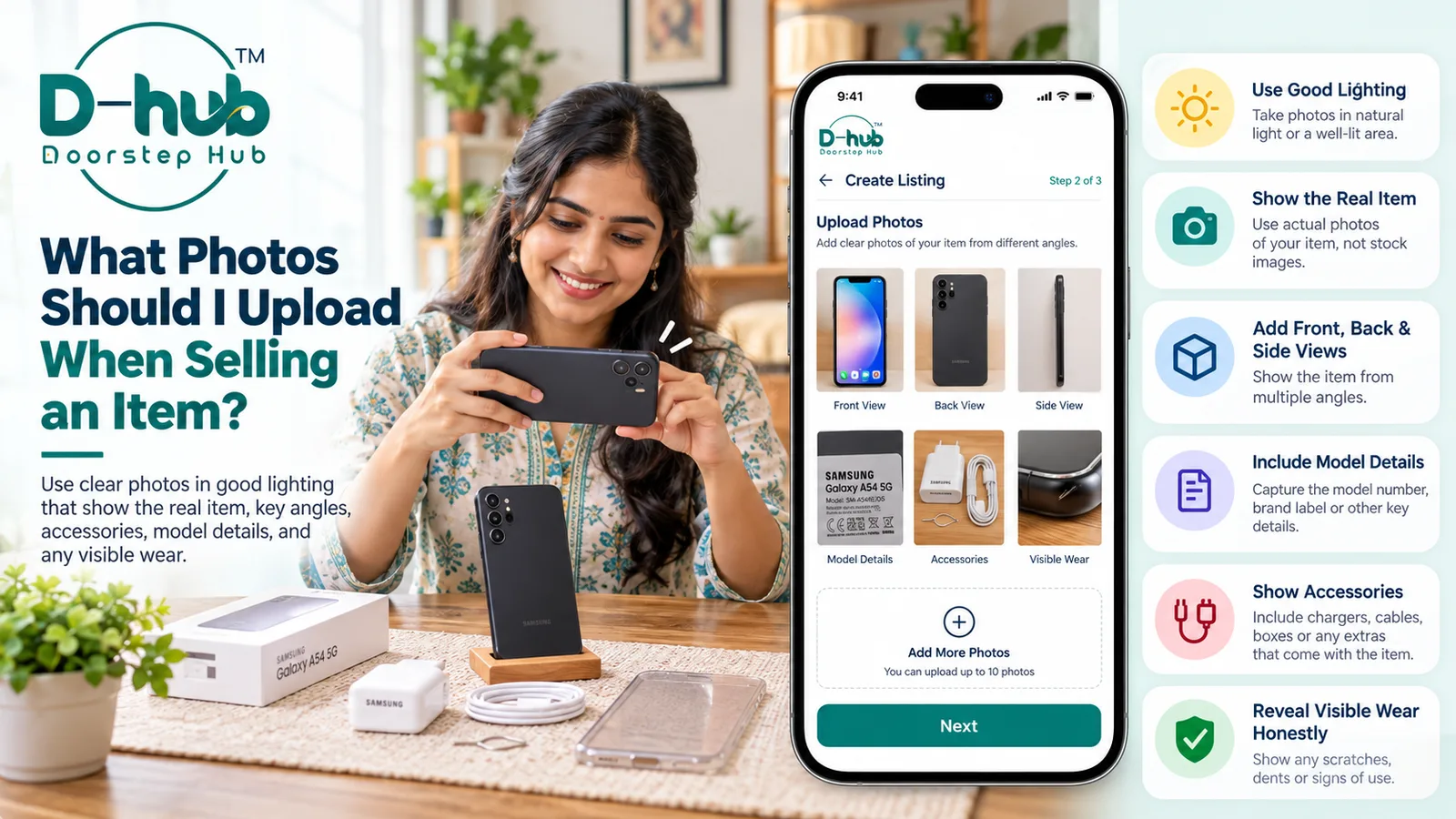
Clear and genuine photographs are one of the most important parts of a Buy & Sell listing. Buyers often look at the photos first to understand the item's appearance, condition, included accessories, and any visible signs of use.
When creating a listing on Doorstep Hub Buy & Sell, use recent photographs of the actual item you are offering instead of unrelated or misleading images.
1. Use Photos of the Actual Item
Always upload genuine photographs of the exact product you are selling.
Avoid using:
- Unrelated stock images
- Manufacturer catalogue photos
- Images copied from other sellers
- Photos of a different model
- Images that do not represent the actual item's condition
Using real photos helps buyers understand exactly what they may be purchasing.
2. Take Photos in Good Lighting
Good lighting makes your listing photos clearer and easier to understand.
Whenever possible:
- Use natural daylight
- Avoid very dark rooms
- Keep the product well illuminated
- Avoid strong shadows
- Reduce glare on screens or shiny surfaces
Clear lighting helps buyers see the item's true appearance and condition.
3. Show the Front of the Item
Take a clear front-facing photograph of the product.
The main image should help buyers immediately recognize the item.
Make sure the product is fully visible and not covered by unnecessary objects.
For electronics, appliances, furniture, and other items, the front view often gives buyers their first impression of the listing.
4. Include Back and Side Views
Do not rely on a single photograph.
Take pictures from different angles so buyers can understand the overall condition.
Where relevant, include:
- Front view
- Back view
- Left side
- Right side
- Top view
- Bottom view
Multiple angles can help buyers inspect the product more clearly before contacting you.
5. Show Brand and Model Information
If the item has a model number, serial label, brand label, specification sticker, or other identifying information, include a clear photo when appropriate.
This may help buyers confirm:
- Brand
- Model
- Product variant
- Size or capacity
- Manufacturing information
- Technical specifications
Make sure the information is readable.
However, avoid displaying sensitive personal information or details that should remain private.
6. Photograph Included Accessories
If accessories are included with the item, show them clearly.
Depending on the product, this may include:
- Charger
- Remote control
- Cables
- Original box
- Adapter
- Carrying case
- Manuals
- Stands
- Additional parts
- Other included accessories
You can photograph the accessories separately or together with the main item.
This helps buyers understand exactly what is included in the sale.
7. Show Visible Signs of Wear
Used items may have scratches, dents, marks, fading, or other signs of normal use.
If these are visible, photograph them clearly.
Examples may include:
- Scratches
- Dents
- Cracks
- Paint wear
- Screen marks
- Chipped edges
- Missing covers
- Discoloration
- Other cosmetic damage
Do not intentionally hide significant wear or damage.
Showing the condition honestly helps buyers make a better-informed decision.
8. Highlight Important Features
You can also include close-up photos of important features.
Depending on the item, this may include:
- Display or screen
- Buttons
- Ports
- Wheels
- Controls
- Interior compartments
- Storage areas
- Key components
- Unique product features
These additional photographs can make the listing more informative.
9. Keep the Background Clean
A simple background helps keep attention on the item.
Before taking photos:
- Remove unnecessary objects
- Keep the surrounding area tidy
- Avoid cluttered backgrounds
- Make sure the product is clearly visible
You do not need a professional studio. A clean and well-lit area is usually enough.
10. Avoid Heavy Editing and Filters
Your listing photos should represent the item's real appearance.
Avoid excessive editing that changes:
- Colour
- Surface condition
- Brightness
- Scratches
- Damage
- Shape
- Product details
Heavy filters or editing can make the product look different from its actual condition.
Basic adjustments for visibility may be useful, but do not edit the image in a way that could mislead buyers.
11. Make Sure Photos Are Clear
Before uploading, review each image carefully.
Check whether:
- The item is in focus
- The photograph is not blurry
- Important details are visible
- Lighting is sufficient
- The image is properly framed
- The correct item is shown
Replace unclear or low-quality images whenever possible.
12. Use Multiple Photos When Needed
One image may not be enough to explain the complete condition of an item.
Use several photographs to show:
- Overall appearance
- Different angles
- Accessories
- Model details
- Important features
- Visible signs of wear
A complete photo set can help buyers understand the item before sending an enquiry.
Why Good Listing Photos Matter
Clear and genuine photographs can make a Buy & Sell listing more informative.
They can help:
- Show the actual product condition
- Reduce unnecessary questions
- Improve buyer understanding
- Show included accessories
- Highlight important features
- Reduce misunderstandings
- Help buyers make informed decisions
The goal is to represent the item accurately rather than make it appear better or worse than it really is.
Create Clear Listings with Doorstep Hub Buy & Sell
When posting an item on Doorstep Hub Buy & Sell, upload recent and genuine photographs that clearly show the product from multiple angles.
Include the front, back, sides, model information, accessories, important features, and visible signs of wear where relevant.
Avoid unrelated stock images or heavily edited photographs that could misrepresent the item.
Need Help with Doorstep Hub Buy & Sell?
📞 Helpline: 8886688666
🌐 Website: doorstephub.com
📲 Download the Doorstep Hub App
Clear photographs can help buyers understand what you are selling and make more informed purchasing decisions.
Frequently Asked Questions
Common troubleshooting questions answered by our specialists
Was this article helpful?
Your feedback helps us improve our repair guides and service tips.