Once you successfully complete a sale through Doorstep Hub Buy & Sell, there are a few important steps you should take before considering the transaction fully complete.
Updating your listing, keeping any necessary records, and protecting your personal information can help you finish the sale more safely and professionally.
1. Mark the Listing as Sold
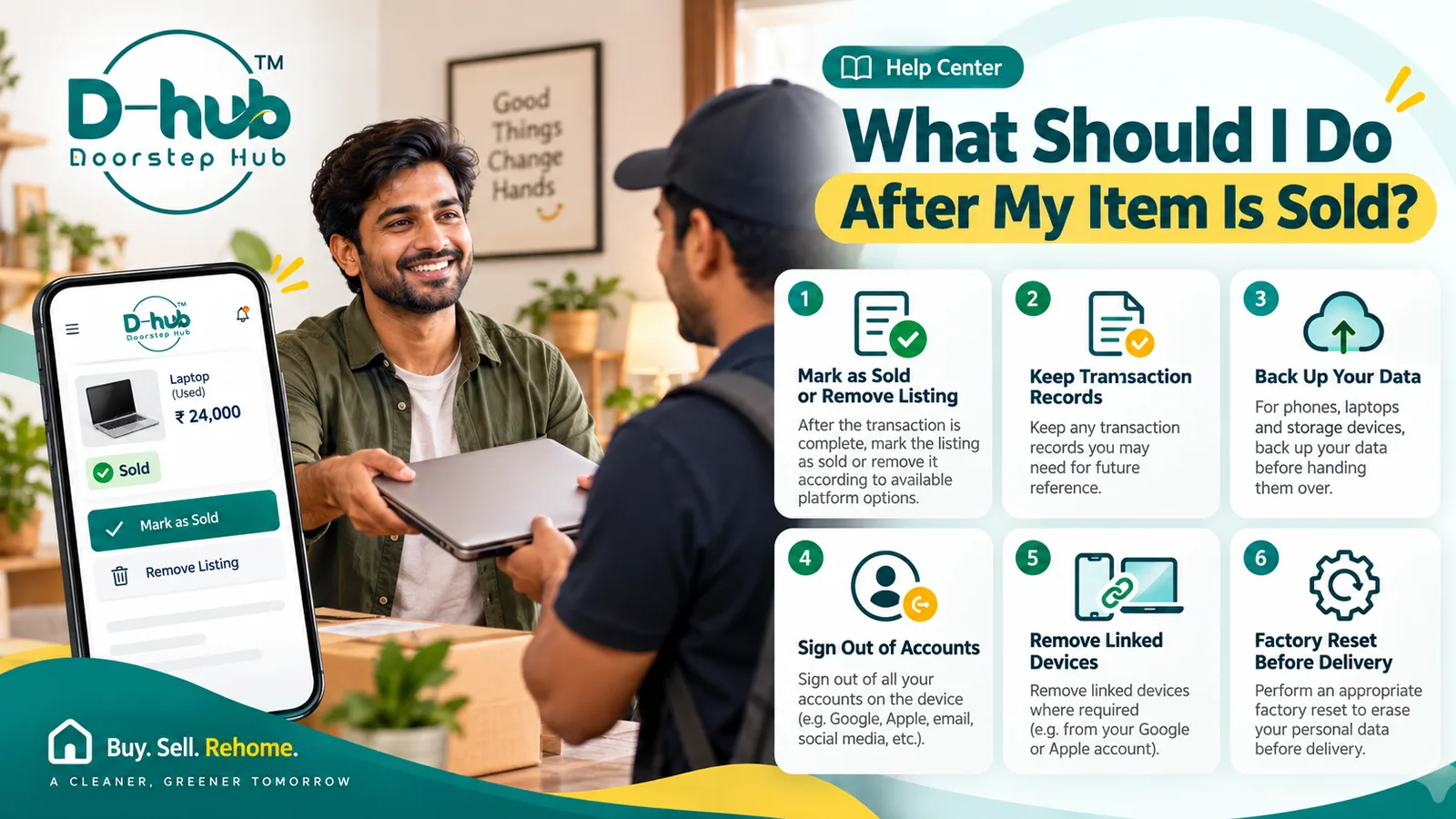
After the buyer has completed the transaction and the item is no longer available, update your listing status where the platform provides this option.
Marking an item as Sold can help:
- Prevent unnecessary enquiries
- Let other buyers know the item is no longer available
- Keep your seller dashboard organized
- Reduce repeated messages about the same product
Update the listing as soon as reasonably practical after the sale is complete.
2. Remove the Listing if Needed
If the platform does not provide a sold status, or if you prefer to remove the advertisement, delete or deactivate the listing where supported.
You may remove the listing when:
- The item has been handed over
- Payment has been completed
- You no longer need the advertisement
- You do not want to receive additional enquiries
Do not leave completed listings active unnecessarily.
3. Keep Appropriate Transaction Records
Depending on the type and value of the item, you may want to keep reasonable records of the transaction.
This may include:
- Basic payment confirmation
- Item details
- Date of sale
- Relevant communication
- Receipt or acknowledgement where applicable
- Ownership-transfer information where relevant
Keep only information that is appropriate and necessary.
Avoid storing unnecessary sensitive personal information.
4. Confirm Payment Before Handover
Before handing over the item, make sure the agreed payment has been completed using the appropriate payment method.
Check the payment through your own trusted bank or payment application.
Do not rely only on:
- Screenshots
- Forwarded messages
- Verbal confirmation
- Images of payment receipts
For digital payments, independently verify that the amount has actually been credited where applicable.
5. Remove Personal Information From Electronic Devices
If you are selling a phone, laptop, tablet, storage device, smart device, or another electronic product that contains personal information, remove your data before handing it over.
Personal information may include:
- Photos
- Videos
- Documents
- Emails
- Saved passwords
- Contacts
- Messages
- Browsing information
- Payment details
- Personal accounts
Do not hand over a device containing information you still need or want to keep private.
6. Back Up Important Data
Before deleting or resetting a device, back up any important information you want to keep.
Depending on the device, you may back up:
- Photos and videos
- Documents
- Contacts
- Application data
- Messages
- Work files
- Other important information
Use a trusted backup method appropriate for your device.
After completing the backup, check that important files have been saved correctly before erasing the original device.
7. Sign Out of Your Accounts
Before transferring ownership of an electronic device, sign out of your accounts where appropriate.
This may include:
- Email accounts
- Cloud-storage accounts
- Social-media accounts
- App stores
- Banking applications
- Streaming accounts
- Work accounts
- Manufacturer accounts
Signing out helps reduce the possibility of the next owner accessing your personal services.
8. Remove Linked Devices and Account Associations
Some phones, laptops, smart devices, and other electronics remain linked to an account even after you sign out locally.
Where applicable, check whether the device should be removed from:
- Your Google account
- Apple ID
- Microsoft account
- Manufacturer account
- Device-management account
- Cloud services
- Security or tracking services
Removing the device from linked accounts can help prevent activation, login, or ownership issues for the next user.
9. Disable Device-Tracking Features
Where applicable, disable tracking or device-lock features before handing the product over.
For example, some devices may have features that remain associated with your personal account.
Make sure the device can be properly set up by the new owner after the sale.
Follow the manufacturer's official instructions where necessary.
10. Remove SIM Cards and Memory Cards
Before handing over a mobile phone, tablet, camera, laptop, or other supported device, check whether it contains removable storage or communication cards.
Remove items such as:
- SIM cards
- Memory cards
- SD cards
- microSD cards
- External storage devices
These may contain personal data or account information.
Only include them in the sale if you specifically intend to do so and have removed any personal information first.
11. Perform an Appropriate Factory Reset
After backing up important data, signing out of accounts, and removing linked services, perform an appropriate factory reset where applicable.
A factory reset can help remove personal data and restore the device closer to its original setup condition.
Before resetting:
- Confirm your backup is complete
- Sign out of important accounts
- Remove linked-device protections
- Remove SIM or memory cards where applicable
- Follow the manufacturer's recommended reset procedure
Do not assume that simply deleting a few files is always sufficient for preparing a device for a new owner.
12. Check the Device After Resetting
Once the reset is complete, review the device before delivery.
Make sure:
- Your accounts are no longer signed in
- Personal files are no longer visible
- The device starts at the setup screen where appropriate
- Important account locks have been removed
- No personal accessories or storage cards remain unintentionally
This final check can help prevent accidental disclosure of personal information.
13. Prepare Included Accessories
Gather all accessories that were promised in the listing or agreed with the buyer.
This may include:
- Charger
- Cables
- Adapter
- Remote control
- Original box
- Manuals
- Carrying case
- Other included accessories
Make sure the buyer receives what was described in the listing.
14. Keep the Item Condition Consistent With the Listing
Before delivery, confirm that the item's condition has not changed since it was listed.
If any new issue appears before handover, inform the buyer.
For example:
- New scratches
- Damage during packing
- Missing accessories
- Functional problems
Clear communication can help prevent misunderstandings.
15. Complete Any Necessary Ownership Transfer
For certain items, additional ownership-transfer steps may be required or appropriate.
This can apply to products such as:
- Vehicles
- Registered devices
- Certain equipment
- Products covered by transferable ownership records
Follow the appropriate legal, manufacturer, or registration process where relevant.
Do not assume that handing over the physical item automatically completes every ownership requirement.
16. Package the Item Carefully
If the item is being transported, protect it appropriately.
Depending on the product, consider using:
- Original packaging
- Protective padding
- Suitable boxes
- Screen protection
- Secure cable storage
- Shock protection
Proper packaging can help reduce accidental damage before the buyer receives the item.
17. Protect Your Personal Information After the Sale
After the transaction, avoid keeping or sharing unnecessary personal information about the buyer.
Similarly, review whether any information you shared during the transaction should no longer remain publicly visible.
Protect:
- Account credentials
- Banking information
- Personal identification details
- Private messages
- Authentication information
A completed transaction should not require continued access to sensitive information.
Why Post-Sale Steps Matter
The selling process does not always end immediately after payment.
Taking a few final steps can help:
- Prevent unnecessary buyer enquiries
- Protect personal data
- Keep your seller dashboard organized
- Reduce account-security risks
- Ensure included accessories are handed over
- Provide a clearer ownership handover
- Complete the transaction more smoothly
This is especially important when selling phones, laptops, tablets, storage devices, and other electronics that may contain personal information.
Complete Your Sale Carefully with Doorstep Hub Buy & Sell
Once a transaction is complete on Doorstep Hub Buy & Sell, mark the listing as sold or remove it according to the available platform options.
Keep any appropriate transaction records you may need, verify payment, and prepare the item carefully for the buyer.
For electronic devices, back up important data, sign out of accounts, remove linked devices where necessary, remove SIM or memory cards, and perform an appropriate factory reset before handing over the product.
Need Help with Doorstep Hub Buy & Sell?
📞 Helpline: 8886688666
🌐 Website: doorstephub.com
📲 Download the Doorstep Hub App
Taking a few careful steps after a sale can help protect your personal information and create a smoother handover for both buyer and seller.
Frequently Asked Questions
Common troubleshooting questions answered by our specialists
Was this article helpful?
Your feedback helps us improve our repair guides and service tips.